











Baobabmart offers you the ability to shop in multiple currencies, allowing you to view prices and make purchases in the currency that suits you most. This guide shows you “how to change your currency settings on Baobabmart“, ensuring a smoother shopping experience.
Why Changing Your Currency Settings?
- Avoid Currency Conversion Fees
- Changing your currency settings to match your local currency can help you avoid to pay conversion fees.
- Simplify Price Comparison
- Viewing prices in your local currency makes it much more easier for you to compare costs and also to understand your total spendings.
- Improve Shopping Experience
- Shopping in your preferred currency enhances your overall experience by providing all the necessary clarity and conveniency.
How to Change Your Currency Settings
- Log In to Your Baobabmart Account
- Visit the Baobabmart website and log into your account using your username and password.
- Go to Account Settings
- Click on your profile icon or name to access your account dashboard.
- Select “Account Settings” from the menu.
- Select Currency Settings
- While in the account settings, find and select the “Currency” section.
- Choose Your Preferred Currency
- From the drop-down menu, select your preferred currency. Baobabmart supports a variety of currencies, including USD, EUR, GBP, CAD, and even more.

Changing Currency During Checkout
- Proceed to Checkout
- Add your items to the cart and proceed to the checkout page.
- Select Currency Option
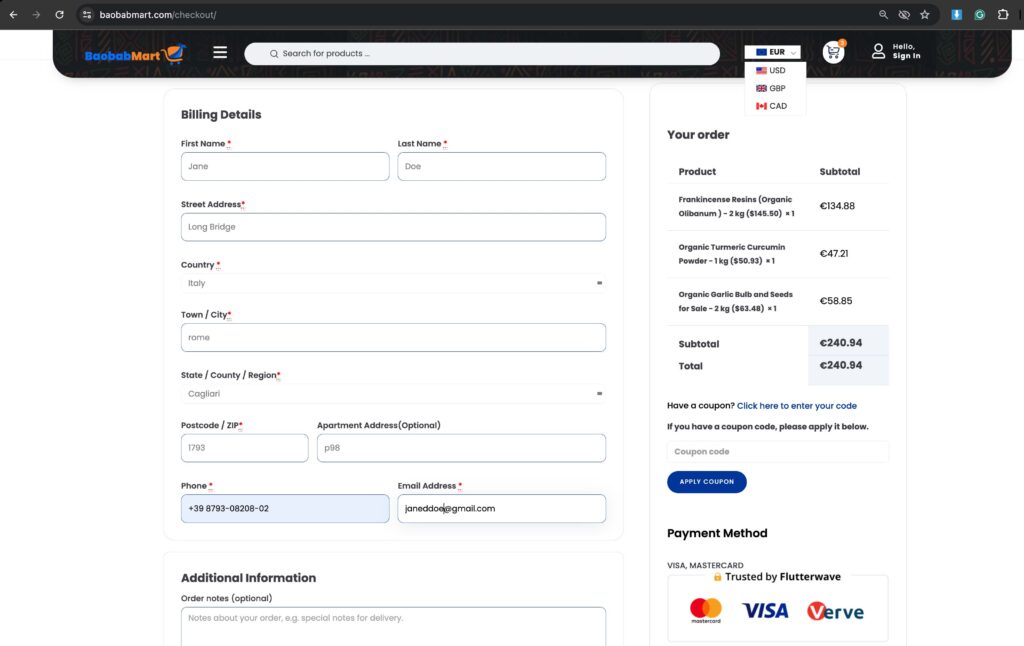
- Once on the checkout page, look for the currency selection option. Choose your preferred currency from the list.
- Review Your Order Total
- Ensure that the order total is displayed in your selected currency. This will help you avoid unexpected conversion fees and as well understand the total amount you will be charged.

Frequently Asked Questions
- Can I change the currency back to the default setting?
- Yes, you can change your currency settings at any time by following the same steps and selecting the default or another preferred currency.
- Will the exchange rate affect my purchase?
- The displayed prices will be in the selected currency, but the actual exchange rate may vary depending on your bank or payment provider.
- What if my preferred currency is not listed?
- If your preferred currency is not available, contact Baobabmart customer support for assistance or choose the closest available option.
Contacting Customer Support
For any questions or assistance with changing your currency settings, contact Baobabmart support:
- Ticket: Create a ticket on the support page
- Live Chat: Available on the Baobabmart website.
Changing your currency settings on Baobabmart is a fairly simple process that improves your shopping experience. Allowing you to display product prices in the currency of your choice. Therefore, follow this guide to easily update your settings while enjoying a more convenient and clearer shopping experience.
Happy shopping at Baobabmart!