










Keeping your account settings up to date on Baobabmart ensures a smooth and personalized shopping experience. This guide explains “how to change your account settings on Baobabmart“, covering everything from updating personal information to managing notifications and security.You can also change your account password or details in your account
Accessing Your Account Settings
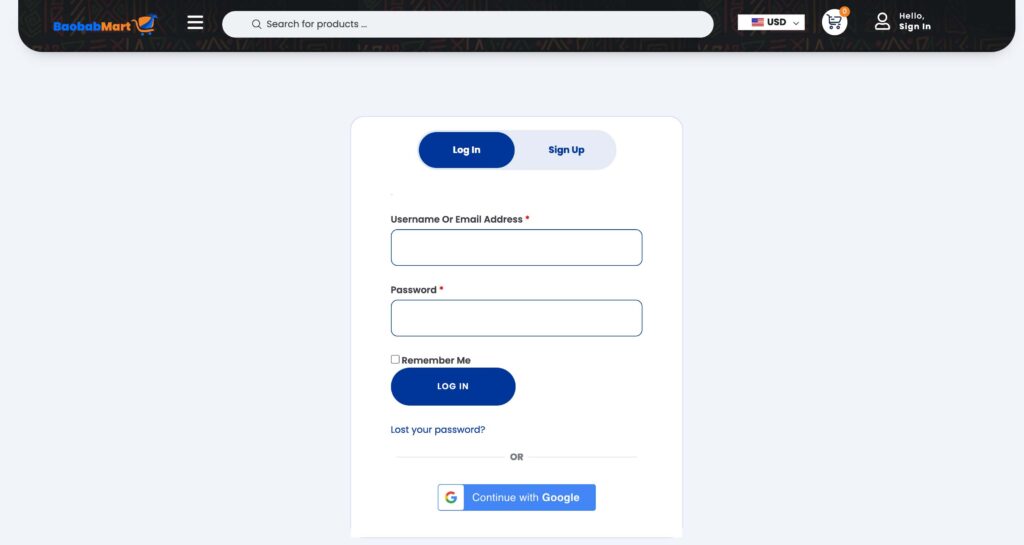
- Log In to Your Baobabmart Account
- Visit the Baobabmart website and log in using your username and password.
- Navigate to Account Settings
- Click on your profile icon or name at the top right corner of the page.
- Select “Account Settings
Updating Personal Information
- Change Your Name
- In the “Personal Information” section, click on “Edit” next to your name.
- Enter your new name and save the changes.
- Update Your Email Address
- Click on “Edit” next to your email address.
- Enter your new email address and confirm it. You may need to verify the new email by following a link sent to your inbox.
- Update Your Address
- Go to the “Addresses” section, click on “Edit” or “Add New Address” to update your shipping and billing addresses.
Changing Payment Methods
- Add a New Payment Method
- Navigate to the “Payment Methods” section.
- Click on “Add New Payment Method” and enter your card or bank details. Save the changes.
- Remove an Existing Payment Method
- In the “Payment Methods” section, select the payment method you wish to remove and click “Delete.”
- Set a Default Payment Method
- Click on the payment method you want to set as default and select “Set as Default.”
Changing Security Settings
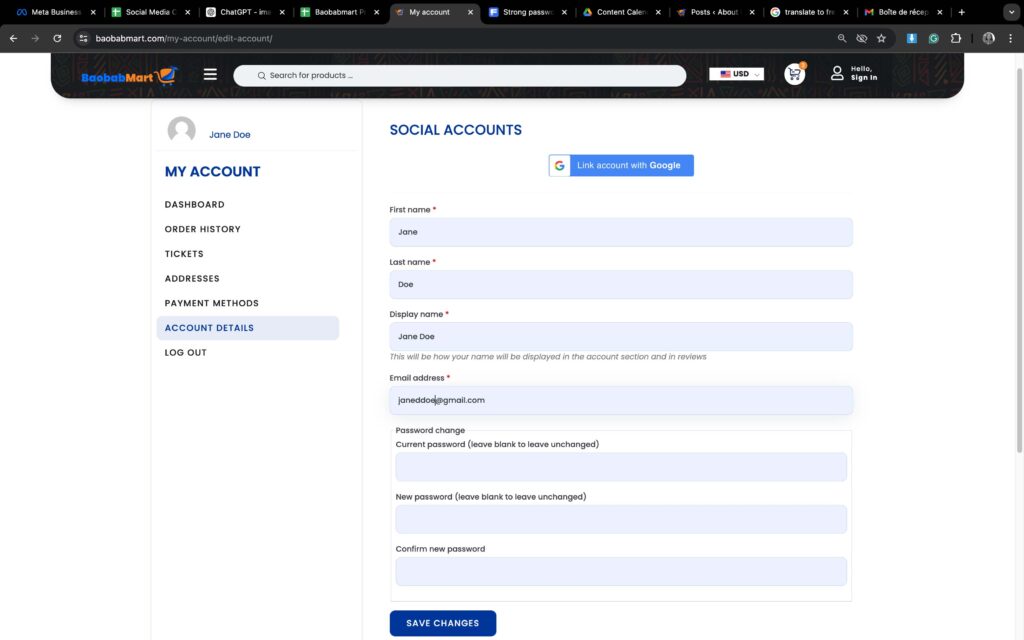
- Update Your Password
- In the “Account Details ” section
- Enter your current password, followed by your new password, and save the changes.
- Enable Two-Factor Authentication
- Click on “Two-Factor Authentication” in the “Security” section.
- Follow the instructions to set up two-factor authentication using your phone or an authentication app.
- Review Account Activity
- Go to “Account Activity” in the “Security” section to review recent logins and account changes. Report any suspicious activity immediately.
Customizing Your Profile
- Change Your Profile Picture
- Click on “Edit Profile” and select “Change Profile Picture.” Upload a new picture from your computer or device.
- Update Display Name
- Go to “Edit Profile” and enter a new display name. Save the changes to update how your name appears on the site.
Tips for Managing Account Settings
- Keep Information Up to Date
- Regularly update your contact details and payment information to avoid issues with orders and communications.
- Review Security Settings Regularly
- Check your security settings periodically to ensure your account is protected against unauthorized access.
- Customize Notifications for Convenience
- Adjust your notification settings to receive only the alerts that are most relevant to you.
Frequently Asked Questions
- How do I reset my password if I forget it?
- Click on “Forgot Password” at the login page, enter your email, and follow the instructions to reset your password.
- Can I change my email address?
- Yes, go to the “Account Settings” and update your email address. You will need to verify the new email.
- How do I add a new shipping address?
- Navigate to the “Addresses” section and click on “Add New Address” to enter your new shipping details.
Contacting Customer Support
For any questions or issues with changing your account settings, contact Baobabmart customer support:
- Ticket: Create a ticket on the support page
- Live Chat: Available on our website.
Keeping your account settings updated on Baobabmart is essential for a secure and personalized shopping experience. Follow this guide to manage your settings effectively and ensure a smooth experience on our platform.
Thank you for being a valued member of Baobabmart. We look forward to serving you!